Kubescape Architecture
This document describes the architecture of Kubescape, covering both the CLI tool and the in-cluster operator.
Overview
Kubescape is designed as a modular security platform that can run in two primary modes:
- CLI Mode - On-demand scanning from your local machine
- Operator Mode - Continuous monitoring within your Kubernetes cluster
Both modes share core scanning logic but differ in how they collect data and report results.
CLI Architecture
The Kubescape CLI is a standalone binary that performs security assessments on-demand.

Core Components
1. Command Layer (cmd/)
The entry point for all CLI operations. Key commands include:
| Command | Description |
|---|---|
scan |
Orchestrates misconfiguration and vulnerability scanning |
scan image |
Container image vulnerability scanning |
fix |
Auto-remediation of misconfigurations |
patch |
Container image patching |
list |
Lists available frameworks and controls |
download |
Downloads artifacts for offline use |
vap |
Validating Admission Policy management |
mcpserver |
MCP server for AI integration |
operator |
Communicates with in-cluster operator |
2. Core Engine (core/)
The main scanning engine that:
- Loads and parses Kubernetes resources
- Evaluates resources against security controls
- Aggregates and formats results
- Manages scan lifecycle and configuration
3. Policy Evaluation (OPA/Rego)
Kubescape uses Open Policy Agent (OPA) as its policy engine:
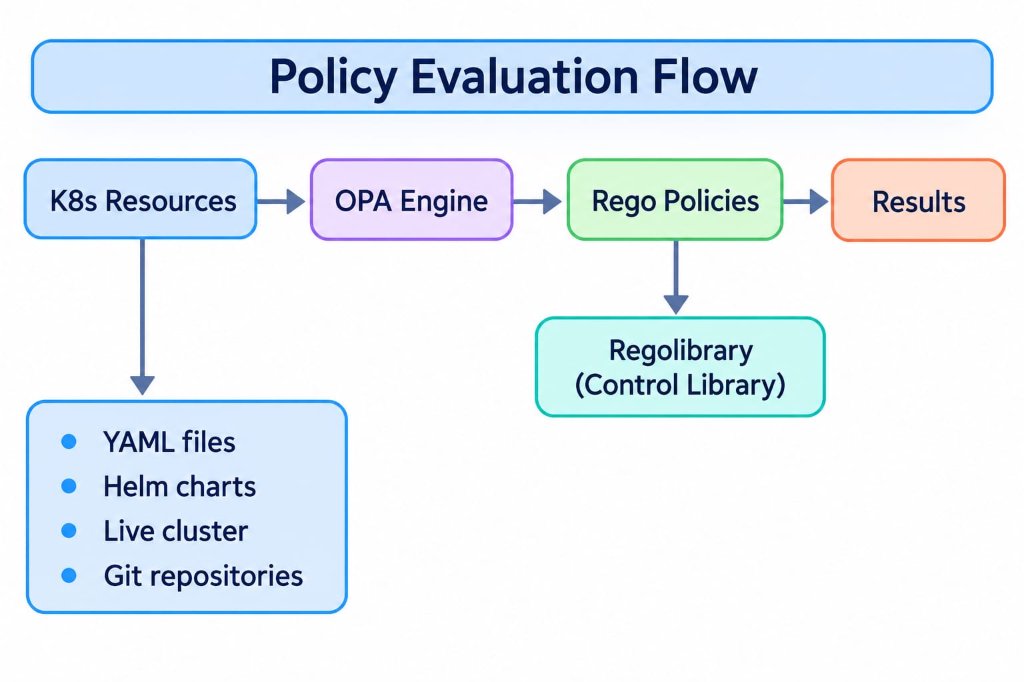
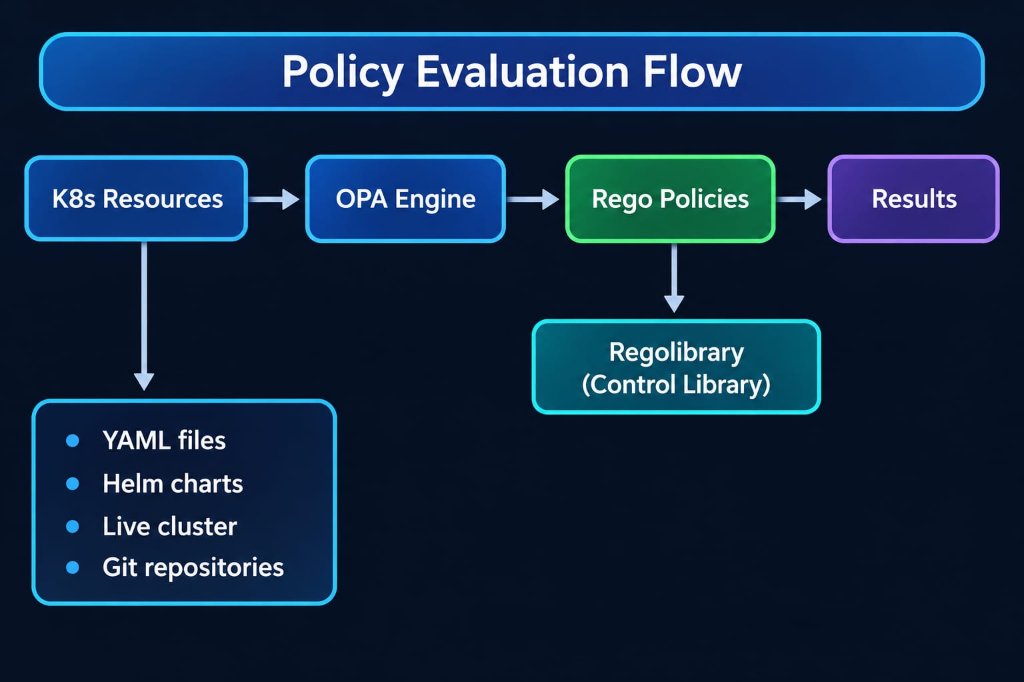
Regolibrary contains: - Security controls (200+) - Framework definitions (NSA-CISA, MITRE ATT&CK, CIS Benchmarks) - Control metadata and remediation guidance
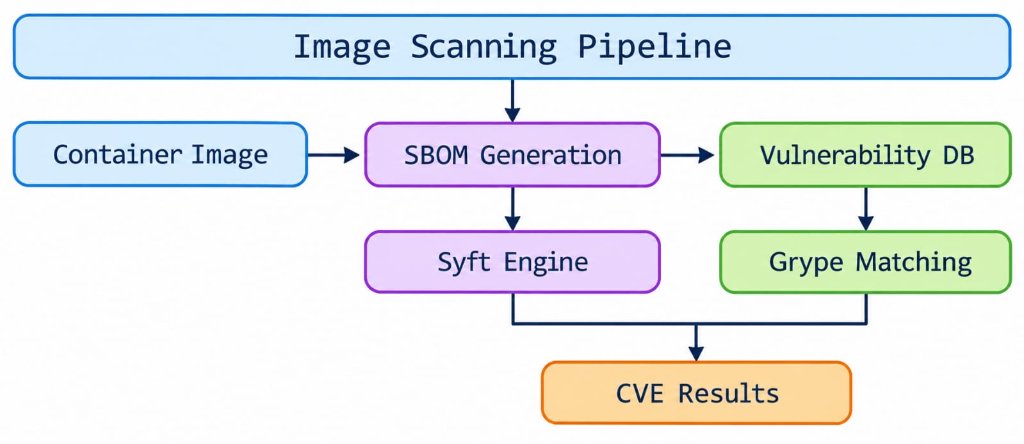
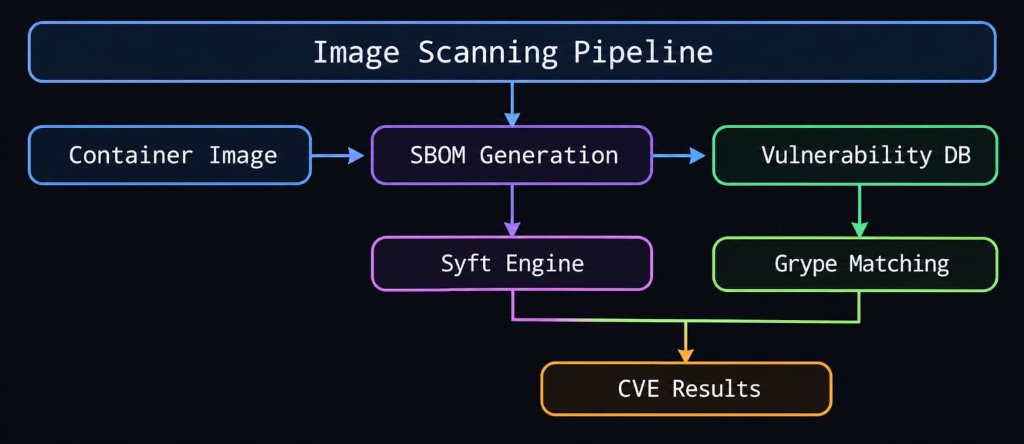
4. Image Scanner (Grype Integration)
For vulnerability scanning, Kubescape integrates Grype:
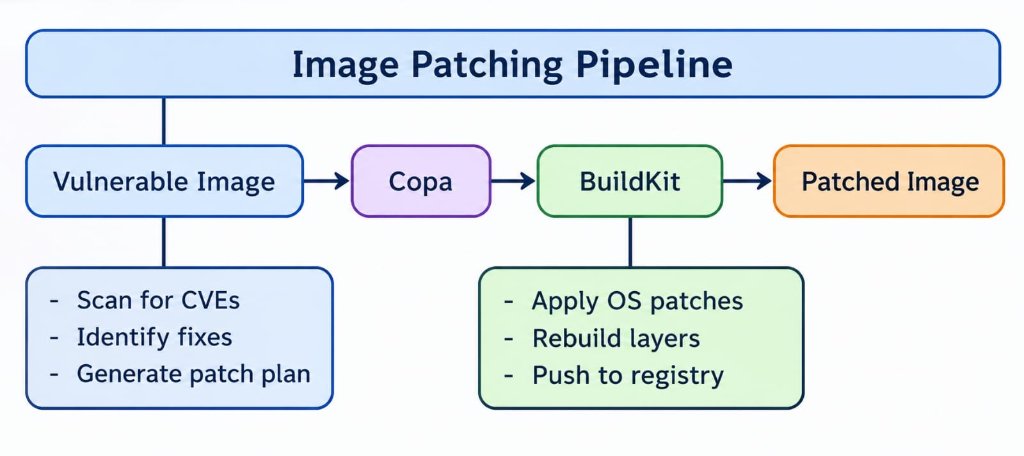
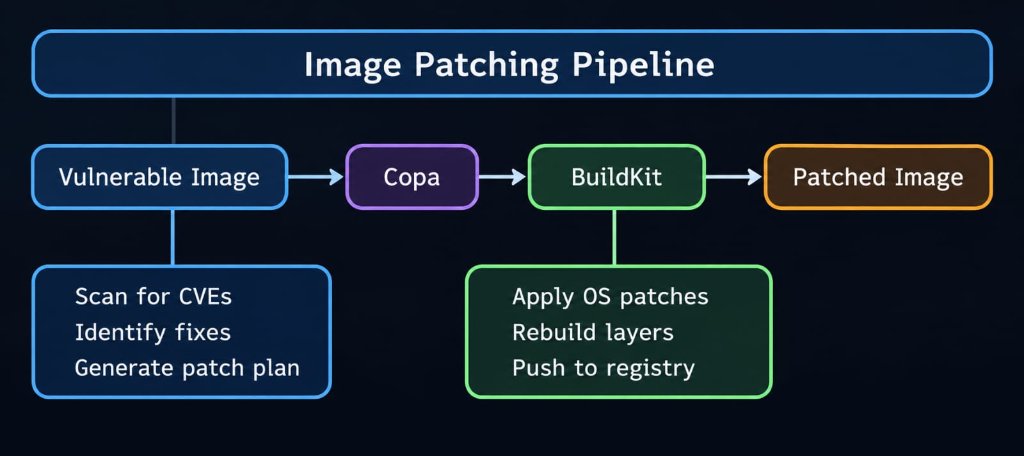
5. Image Patcher (Copacetic Integration)
For patching vulnerable images, Kubescape uses Copacetic:
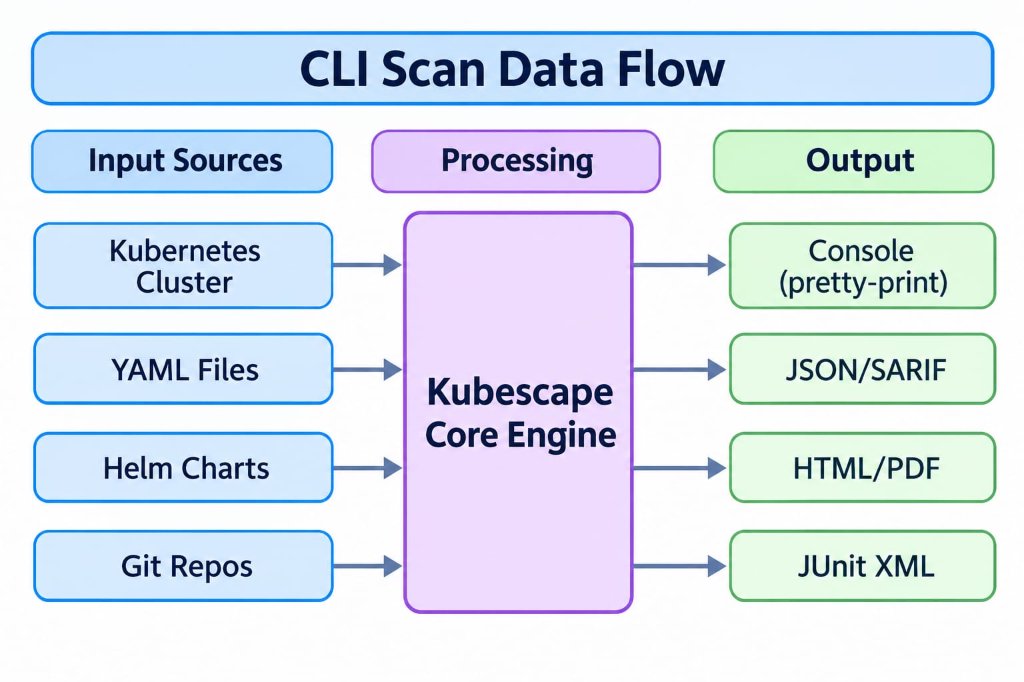
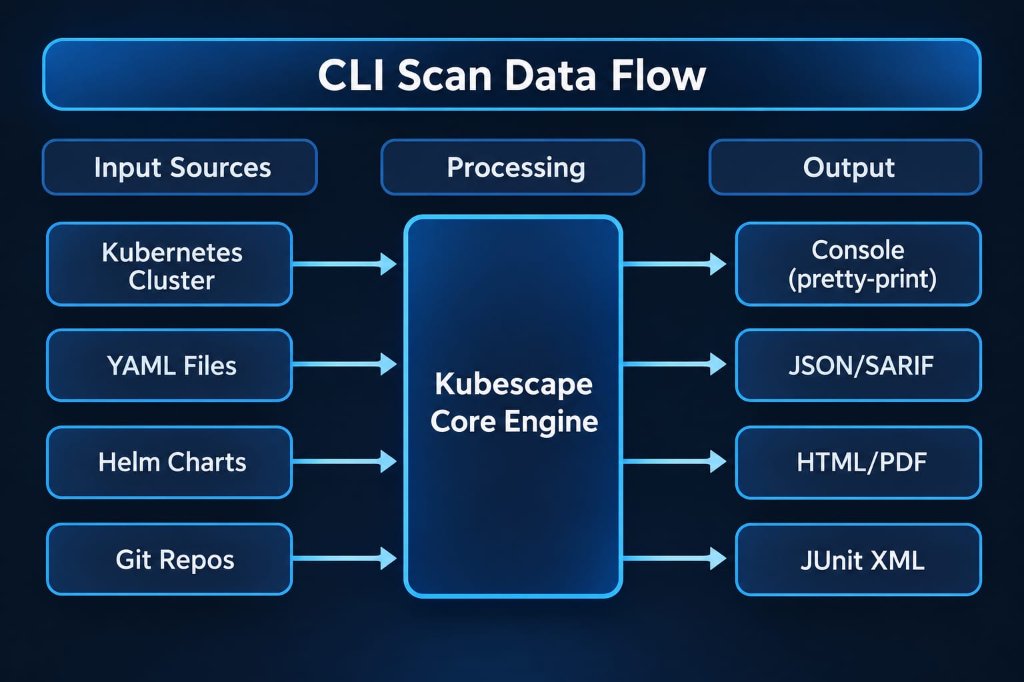
Data Flow (CLI Scan)
Operator Architecture (In-Cluster)
The Kubescape Operator provides continuous security monitoring within the cluster.

Components
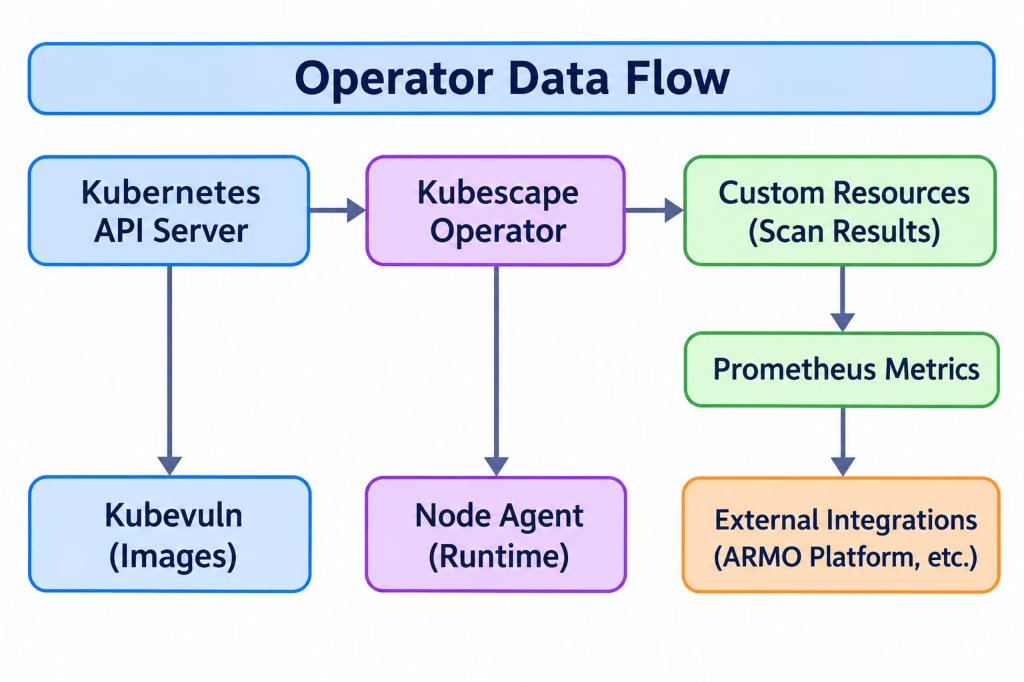
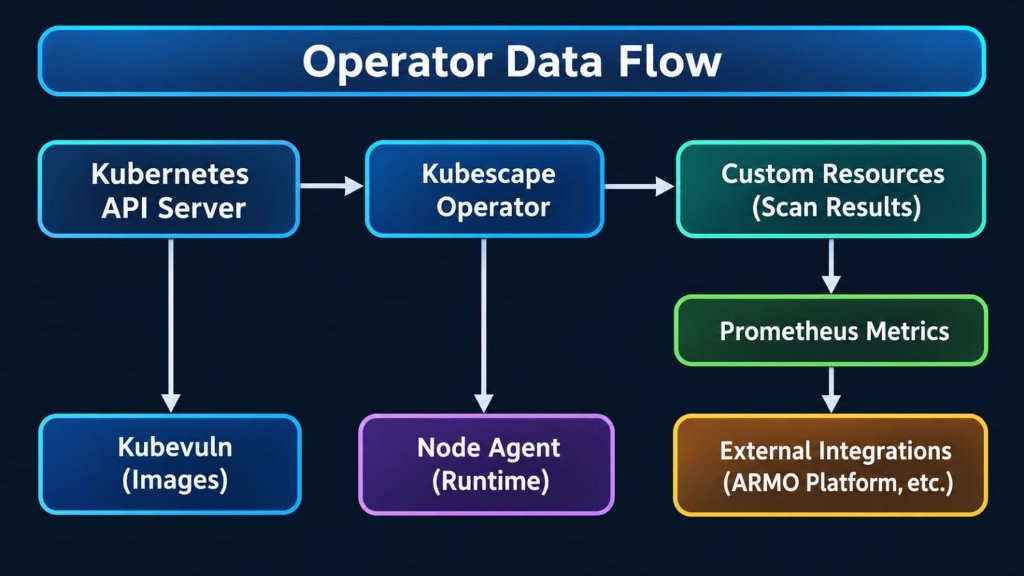
1. Kubescape Operator
The main controller that: - Watches for changes to Kubernetes resources - Triggers scans on schedule or on-demand - Manages scan lifecycle - Stores results in Custom Resources
2. Kubevuln
Handles container image vulnerability scanning:
- Scans images running in the cluster
- Generates SBOMs (Software Bill of Materials)
- Matches against vulnerability databases
- Creates VulnerabilityManifest CRs
3. Host Scanner
Collects security-relevant information from cluster nodes: - Kernel parameters - Kubelet configuration - Container runtime settings - File permissions
4. Storage
Kubescape uses Custom Resources to store scan results:
| CRD | Description |
|---|---|
VulnerabilityManifest |
Image vulnerability scan results |
VulnerabilityManifestSummary |
Aggregated vulnerability summaries |
WorkloadConfigurationScan |
Misconfiguration scan results |
WorkloadConfigurationScanSummary |
Aggregated configuration summaries |
ApplicationProfile |
Runtime behavior profiles |
NetworkNeighborhood |
Observed network connections |
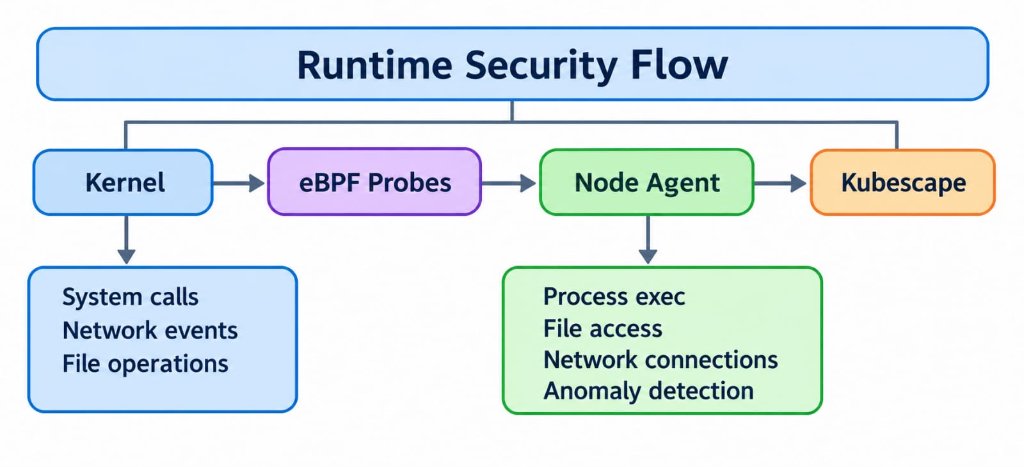
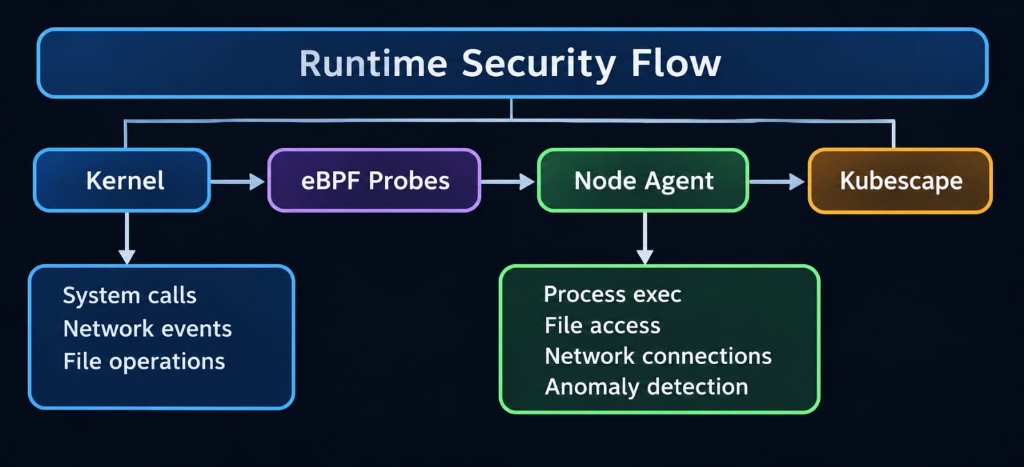
5. Node Agent (Runtime Security)
For runtime security, the Node Agent uses eBPF via Inspektor Gadget:
Data Flow (Operator)
Frameworks and Controls
Kubescape evaluates resources against security frameworks:
Supported Frameworks
| Framework | Description |
|---|---|
| NSA-CISA | Kubernetes Hardening Guidance |
| MITRE ATT&CK | Threat-based security framework |
| CIS Benchmarks | Center for Internet Security best practices |
| SOC2 | Service Organization Control 2 |
| HIPAA | Healthcare compliance requirements |
| PCI-DSS | Payment Card Industry standards |
Control Structure
Control:
  id: C-0005
  name: API server insecure port is enabled
  description: Check if the API server insecure port is enabled
  frameworks:
    - NSA
    - MITRE
  severity: High
  remediation: |
    Disable the insecure port by setting --insecure-port=0
  rules:
    - rego: |
        # OPA/Rego policy code
Actors and actions
Who and what interacts with Kubescape, and what each one does. The interfaces they use are listed in External interfaces.
| Actor | Through | Actions |
|---|---|---|
| User (developer or cluster operator) | The CLI, the kubectl plugin or the CLI container image | Scans manifests, Helm charts, repositories, clusters and images; fixes manifests; patches images; manages configuration and offline artifacts |
| CI pipeline | The CLI, run non-interactively | The same as a user. Gates on the exit code and publishes reports such as SARIF or JUnit |
| AI assistant (MCP client) | kubescape mcpserver |
Reads the vulnerability and configuration results the operator stores in the cluster, and runs scans through the server's tools |
| HTTP API client, usually the Kubescape Operator | The REST API of the microservice image | Starts and cancels scans, polls their status, and reads and deletes their results |
| Kubernetes API server | A kubeconfig, or the pod's service account for the microservice | Serves the resources a cluster scan reads. kubescape operator port-forwards through it to the operator |
| Container registries | Image references | Serve images for image scanning. kubescape patch pushes the patched image to a registry with --push, or loads it into the local Docker daemon |
| Policy source | HTTPS, or a local directory | Provides frameworks, controls, exceptions and control inputs: the regolibrary GitHub releases by default, or local files given with --use-from or --use-artifacts-from |
| Vulnerability database | HTTPS, or the HTTP(S) URL given with --grype-db-url |
Provides the Grype database for image scanning |
| Git hosts | Git over HTTPS | Serve the repository when a scan target is a remote Git URL |
| Kubescape backend (optional) | HTTPS, or HTTP for a configured backend URL that starts with http://. The CLI uses it only when an account ID or --server is configured. The microservice uses it when it finds a service-discovery file (KS_SERVICE_DISCOVERY_FILE_PATH, by default /etc/config/services.json), which supplies the endpoints without a discovery request; otherwise when any of API_URL, an account ID or an access key is set, which makes it send a discovery request to API_URL, by default api.armosec.io |
Provides policies, exceptions and control inputs in place of the regolibrary, and receives reports sent with --submit |
| Webhook receivers (optional) | HTTP(S) POST to the --notify URL, only with --notify. Whether it is encrypted depends on the URL's scheme |
Receive the scan summary: a Block Kit message for Slack, an Adaptive Card for Microsoft Teams, and the summary JSON for any other URL |
| Cloud provider APIs (EKS, GKE, AKS) | The cloud SDK's default credentials, during a scan of a managed cluster | Describe the cluster and its registries, for the controls that need that data |
| Version check service | HTTPS POST to version-check.ks-services.co on scan and version unless KS_SKIP_UPDATE_CHECK is true, and on update always |
Receives the client version and build, the framework and scanning context, whether the run came from a pipeline, the account ID when one is configured, the Helm chart version when run from the chart, and for a cluster scan the node count and an ID derived from the cluster's kubernetes Service. Replies with the latest release |
| Scan callback receivers (optional) | HTTP(S) POST to the URL a client passes as callback on POST /v1/scan. Off unless KS_CALLBACK_ENABLED is true or KS_CALLBACK_ALLOWED_CIDRS is set |
Receive a JSON signal with the scan's id, its status (completed or failed) and, on failure, an error, then fetch the results with GET /v1/results. With KS_CALLBACK_ALLOWED_CIDRS set, the resolved address must fall inside it; otherwise loopback, link-local unicast, private, unspecified and multicast addresses are refused, along with CGNAT (100.64.0.0/10), 0.0.0.0/8 and 255.255.255.255. Other reserved ranges are not screened. The URL must not carry credentials, the resolved address is the one dialed, redirects are not followed, and delivery is best-effort, up to three attempts within 20 seconds |
| OpenTelemetry collector for the CLI (optional) | OTLP over gRPC or HTTP (OTEL_EXPORTER_OTLP_PROTOCOL), when --otel-endpoint or any of OTEL_EXPORTER_OTLP_ENDPOINT, OTEL_EXPORTER_OTLP_TRACES_ENDPOINT and OTEL_EXPORTER_OTLP_METRICS_ENDPOINT is set, including when inherited from the environment |
Receives a scan's traces and metrics. When the run hides or encrypts its report, the attributes identifying the host are left out |
| OpenTelemetry collector for the microservice (optional) | OTLP over plain HTTP to the host:port in OTEL_COLLECTOR_SVC, when that variable is set. It must be an OTLP/HTTP receiver, usually on port 4318; a gRPC-only endpoint receives nothing |
Receives the microservice's traces, logs and metrics, tagged with the account ID and cluster name |
External interfaces
Exposed
| Interface | Released in | Described in |
|---|---|---|
| Command line: commands, flags, environment variables and exit codes | CLI binaries, kubectl plugin, CLI image | CLI reference |
Scan reports, written to stdout or a file in the formats --format accepts |
CLI binaries, kubectl plugin, CLI image | CLI reference: kubescape scan |
Local configuration and cache in ~/.kubescape, or KS_CACHE_DIR |
CLI binaries, kubectl plugin, CLI image | CLI reference: kubescape config |
MCP server, over stdio by default or over SSE on 127.0.0.1 with --transport sse |
CLI binaries, kubectl plugin, CLI image | MCP server |
REST API on port 8080 (KS_PORT): /v1/scan, /v1/status, /v1/results and the deprecated /v1/metrics, the /livez and /readyz probes, and the OpenAPI document at /openapi/v2/. When KS_API_TOKEN is set, /v1/* requires it as a bearer token. POST /v1/scan takes an optional callback URL, described under scan callback receivers in Actors and actions |
Microservice image | HTTP handler |
pprof debug server, off unless KS_PPROF_ENABLED is true, bound to 127.0.0.1:6060 unless KS_PPROF_ADDR says otherwise |
Microservice image | HTTP handler: environment variables |
Consumed
The outbound connections in Actors and actions. A scan of a cluster, an image or a remote repository reaches the Kubernetes API server, the registry or the Git host it targets. It also fetches its policies, unless they are given as local files (--use-artifacts-from, --use-from), and for image scanning the vulnerability database, from the server --grype-db-url names if set, such as a local mirror. The version check runs on update, and on scan and version unless KS_SKIP_UPDATE_CHECK is set. Cloud provider APIs are called only for a managed cluster. The Kubescape backend, webhook and scan callback receivers, and OpenTelemetry collectors are contacted only when configured, and configuration the process inherits counts: an OTEL_EXPORTER_OTLP_* variable in the environment, or a service-discovery file mounted into the microservice's pod.
Security Model
CLI Mode
- Runs with the permissions of the executing user
- Uses kubeconfig for cluster access
- No persistent state in the cluster
- Results stored locally or sent to configured backend
Operator Mode
- Runs as a Kubernetes workload
- Uses ServiceAccount with defined RBAC
- Stores results as Custom Resources
- Can send data to external backends (optional)
Network Requirements
| Component | Outbound Connections |
|---|---|
| CLI | Vulnerability DB updates, framework downloads |
| Operator | Vulnerability DB updates, optional backend |
| Offline | All artifacts can be pre-downloaded |
Extensibility
Custom Controls
You can create custom controls using Rego:
package armo_builtins
import rego.v1

deny contains msga if {
    # Your custom policy logic
    input.kind == "Deployment"
    not input.spec.template.spec.securityContext.runAsNonRoot

    msga := {
        "alertMessage": "Deployment should run as non-root",
        "alertScore": 7,
        "failedPaths": ["spec.template.spec.securityContext.runAsNonRoot"],
        "fixPaths": [{"path": "spec.template.spec.securityContext.runAsNonRoot", "value": "true"}]
    }
}
Integration Points
- HTTP API - For programmatic access (see httphandler docs)
- MCP Server - For AI assistant integration (see mcp-server docs)
- Prometheus Metrics - For monitoring and alerting
- Webhook - For external notifications